GOVIND RATHI
INDIA,
5:14 PM
¯\_
(ツ)
_/¯
Apologies. Mobile version is a WIP.
Please open using Desktop
BACK
Building a Figma Plugin to Solve the UX Writing Problem No One Talks About
Designers guess microcopy. Writers clean it up. I built a tool that puts writing guidelines right on the canvas so neither has to.
Problem
How many times have you paused while designing a workflow to wonder: Should this be "Submit" or "Confirm"? Should I use Title Case or Sentence case for this heading?
It seems small in silo but at scale, across dozens of verticals and hundreds of screens, these micro-decisions paralyse velocity. The answer usually exists, hidden in a documentation site or inside a UX writer’s head, but the friction of finding it is too high. So, we guess.
This creates a two fold problem:
Product Designers guess and move on. Time gets wasted hunting for the right guideline and when it can't be found, the best guess ships as a draft, piling up as backlog.
UX Writers become spell-checkers. Instead of focusing their craft on narrative flow and edge cases, reviews turn into cleanup duty fixing basic casing and grammar.
The Antidote
To create an adoptable solution, it needed to have two core pillars right:
Zero Friction: The help had to live where the work happens. The moment you ask a designer to open a new tab, search a docs site, or ping a Slack channel, you've already lost them. So I chose to build a Figma plugin putting the answers on the canvas, not a context-switch away.
Specific Context: Every product has its own voice, its own rules. The help needed to be contextual and specific to how Whatfix writes. So I attached a knowledge base of our actual writing guidelines to the AI, making every response grounded in how we write.
In Action
Auditing a component
Checking guidelines for a component
Asking a specific question
The Anatomy
The user asks, the assistant thinks, the response comes back. Here's what's in between.
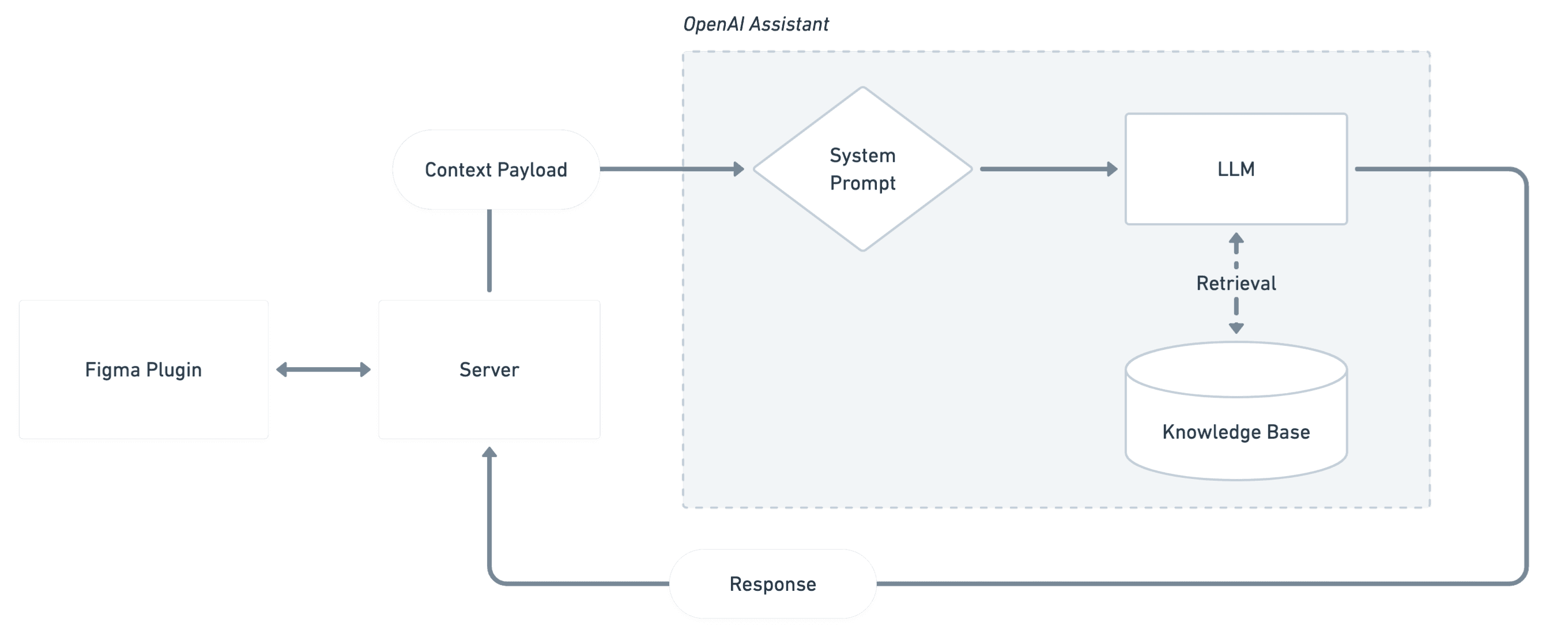
The Plugin is the interface layer. It captures the user's query along with the component context — a screenshot, text layers with labels, and component properties — packages it as the "Context Payload," sends it to the server, and renders the response back in a chat.
The OpenAI Assistant receives this payload along with the query, routed through a system prompt that frames the task. The LLM analyzes the query, retrieves the relevant guidelines from the knowledge base, and streams the response back to the plugin.
The Server sits in between, managing sessions and storing conversation threads so the assistant remembers prior context within a session.
Learnings
Some learnings I made across the journey, the hard way.
Garbage in is Garbage out. My first strategy was dumping everything the raw Figma JSON, straight to the LLM, expecting it to figure things out. It didn't. The model drowned in noise, hallucinated component names, and confused elements with each other. The fix was curating what the model sees. I stripped the payload to the essentials and the responses got faster and dramatically more accurate.
Outsource whatever you can. The initial approach fell into the "Over Engineering Trap" trying to build a custom RAG system which became a black box impossible to debug. Scrapping it for an out-of-the-box tool like OpenAI Assistants and letting it handle the internal plumbing freed up all the focus for orchestrating the actual solution.
Some design problems are engineering problems. When responses felt sluggish, the answer wasn't a better loading spinner, it was enabling streaming, making the wait perceptually instant. When the assistant forgot what was said two messages ago, it wasn't a UI problem, it was a missing session thread on the backend. If the experience feels off, look under the hood before reaching for a design band-aid.
One-shot is a myth. Designing with AI isn't like casting a spell; it’s like sculpting. The first prompt is mostly garbage, and the version that makes a user say "Wow" is usually version 50. Quality is the result of the nuances and improvements you put through thousand invisible edits.